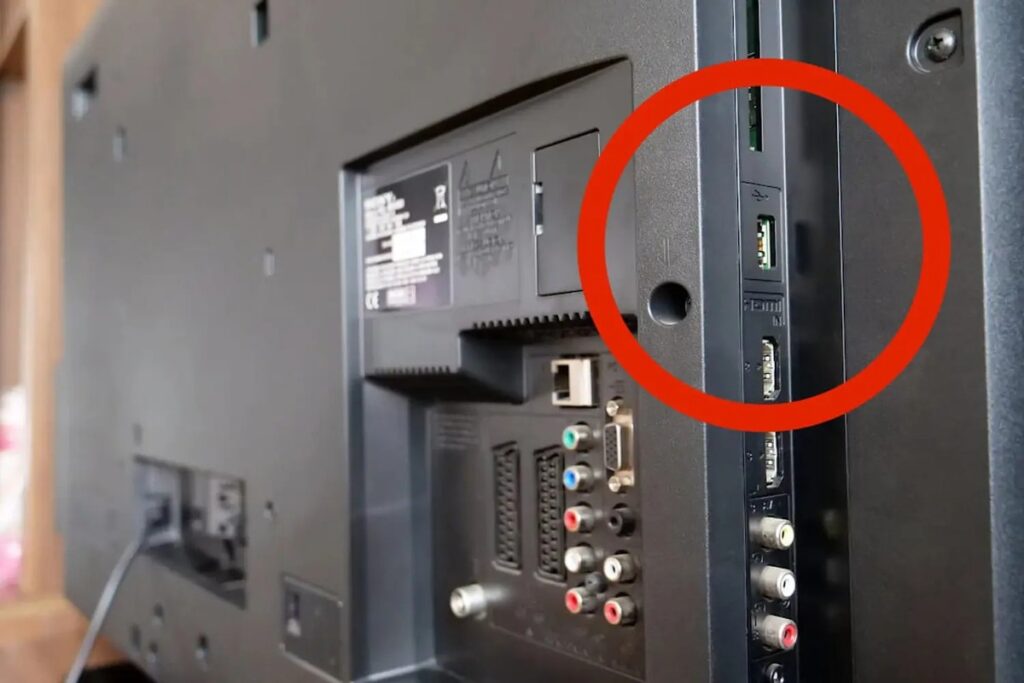
It’s one of those subtle features that often goes unnoticed – a small USB slot tucked away at the back of your TV, quietly capable of much more than you might think. Often overlooked, this unassuming port is far more versatile than the average viewer realises.
Beyond the Basics of Viewing
For many of us, the USB port on our TVs serves a simple function: connecting a memory stick loaded with family photos or a couple of films. While that’s certainly a common and practical application—insert a USB drive and you can revisit cherished holiday snaps, relive memorable home videos, or catch a flick you’ve downloaded in formats like MP4, MKV, or AVI—there’s much more to it than that.
Indeed, many contemporary TVs allow you to record live broadcasts directly onto a USB drive, making it easy to catch up on missed shows. Additionally, some models enable you to use an external drive to expand your TV’s storage, providing extra space for app installations or temporary data storage without the hassle of deleting content.
Transforming Your TV into a Mini Workstation
This is where things start to get truly exciting. That same humble USB port can effectively turn your TV into a computer monitor. By connecting a keyboard and mouse, you can smoothly navigate menus, browse steaming platforms, or even go online, particularly on smart TVs equipped with a built-in browser. It’s a game-changer for those who prefer using a larger screen.
Gamers will also find new potential here. Many modern TVs support USB game controllers, allowing you to play compatible games directly on your TV without the need for a console or additional power supply. This small addition can reinvent your smart TV experience.
Smart Connections for Your Mobile
Got a modern smartphone? You’re likely able to connect it to your television with a USB-C to USB-A adapter. This straightforward connection enables you to mirror your phone’s display on the TV screen, perfect for sharing photos with friends, streaming videos, or even delivering presentations during meetings.
Not every smartphone will support this feature, so it’s wise to double-check your model, but for those that do, this method provides a sleek, cable-free way to share your screen without dealing with Bluetooth or Wi-Fi settings.
An Unexpected Power Source
Perhaps the most underappreciated use of your TV’s USB port is its ability to charge other devices. Since it remains plugged into the mains, it can supply enough power to recharge a smartphone, smartwatch, or tablet. While it may not be as speedy as a dedicated charger, it proves handy in tight spots—like those moments when you can’t find your charger or every socket is occupied.
A Small Feature with Significant Possibilities
So next time you find yourself glancing at the back of your TV, don’t underestimate that tiny port. Whether you’re expanding storage, charging devices, or revamping your living room setup, the modest USB connection is a low-key superstar.
It serves as a reminder that sometimes, the most innovative technology is not found in the latest features—it’s been right there in front of us all along, patiently waiting for us to plug in.